Free Chrome extension for AI chat

Rough draft in.
Clear prompt out.

Type a quick thought in ChatGPT, Claude, Gemini, Perplexity or Grok and press ⊕. Prompt Memory rewrites it into a clearer prompt on a card beside the chat box. Read it, then use it or keep your own.

  • 15 free rewrites a day
  • No card needed
  • Nothing is sent until you press ⊕
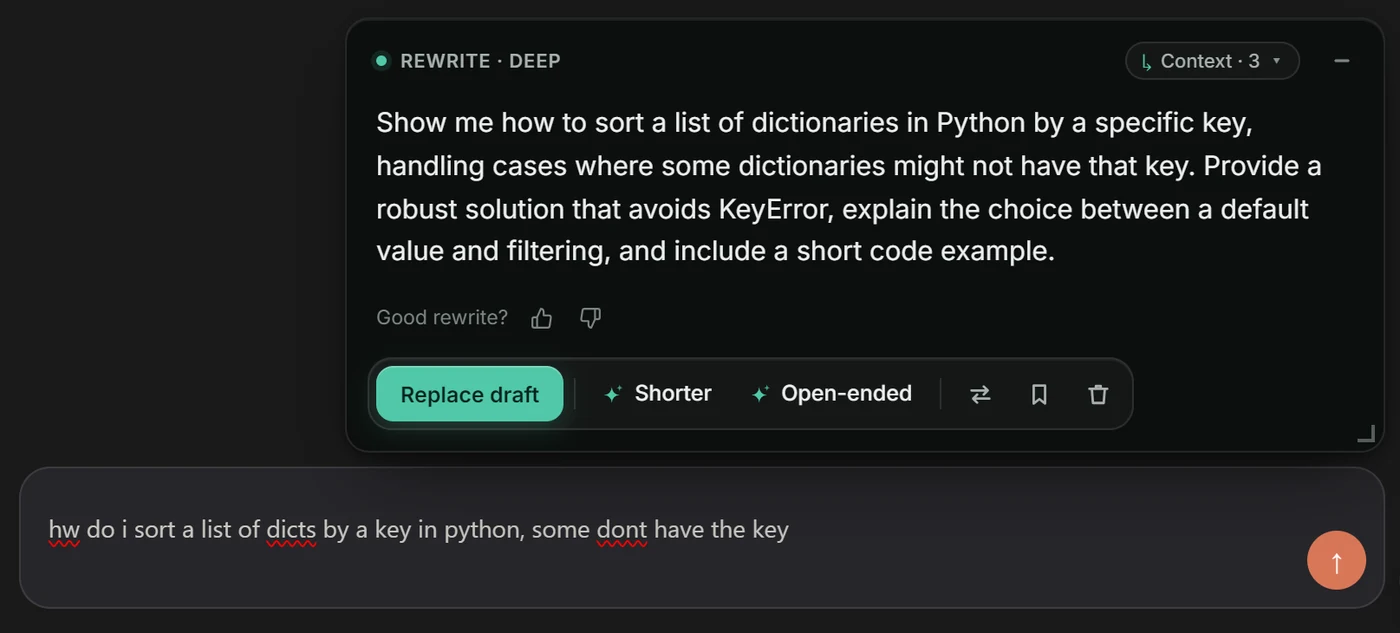
A rough draft, “hw do i sort a list of dicts by a key in python, some dont have the key”, in a chat box. Above it, Prompt Memory's card shows a clear rewritten prompt with Replace draft, Shorter and Open-ended buttons.

The real extension on a test chat page. AI can add assumptions, so read a rewrite before you use it.

Works inside the chat you already use

  • ChatGPT
  • Claude
  • Gemini
  • Perplexity
  • Grok

How it works

Three steps, and you stay in charge of the last one.

  1. 1

    Type it the way you think it

    Write your draft in the chat box as usual. Typos, half sentences and shorthand are fine.

  2. 2

    Press ⊕

    Click the button at the corner of the page or press Ctrl+Shift+E (⌘+Shift+E on a Mac). The rewrite streams onto a card.

  3. 3

    Read it, then decide

    Replace your draft, try another style, or dismiss it. Nothing reaches the chat until you press send.

Features

A rewrite first. Your own prompts when you need them.

See what shaped every rewrite

The card names the saved prompts it used, including the ones Prompt Memory found by itself. Disagree with one? Leave it out and rewrite again.

  • Up to six recent chat messages as context, with a switch to turn it off
  • Every version stays on the card, so going back is free
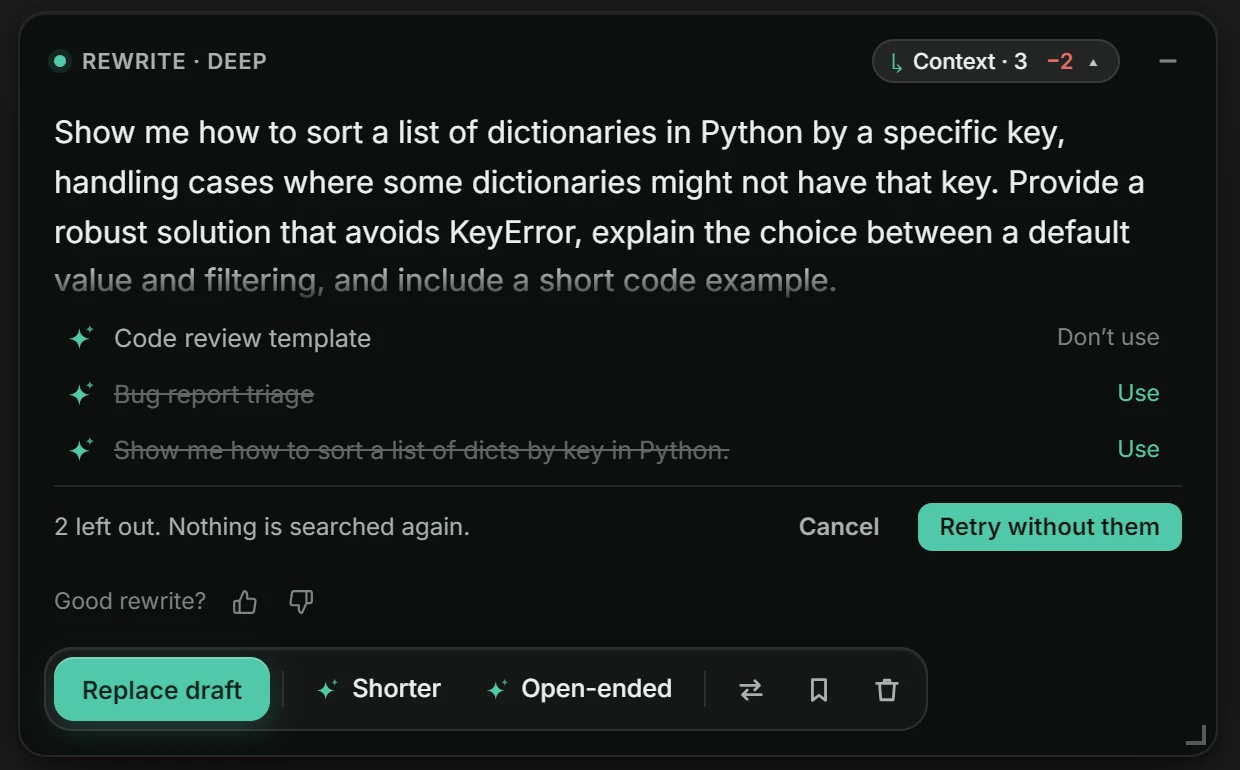
The rewrite card with its context list open: three saved prompts that shaped the rewrite, two of them left out, and a “Retry without them” button.

Your saved prompts, one // away

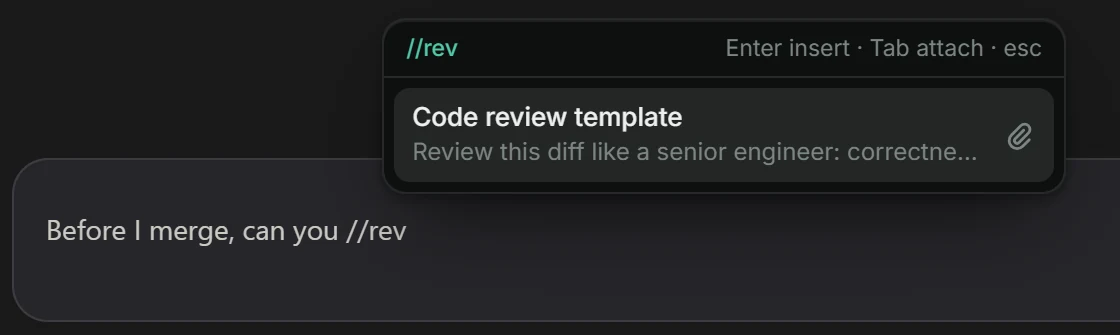
Save the prompts and details you keep retyping. Type // in any supported chat to search them and drop one in, without leaving the message box.

  • Enter inserts the prompt, Tab attaches it as context
  • The same library on every site
Typing “//rev” in a chat box opens a small menu offering the saved prompt “Code review template”.

Save any text as context

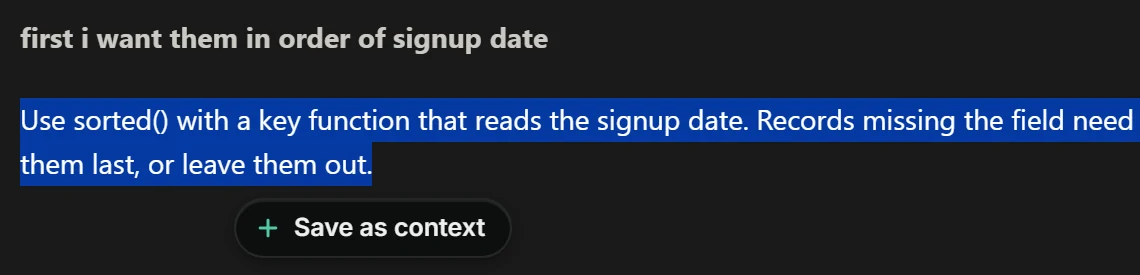
Select a useful answer or a block of your own notes on the page and save it in one click. It is there the next time a rewrite needs it.

A selected paragraph in a chat with a “Save as context” button beneath it.

Every prompt, one library

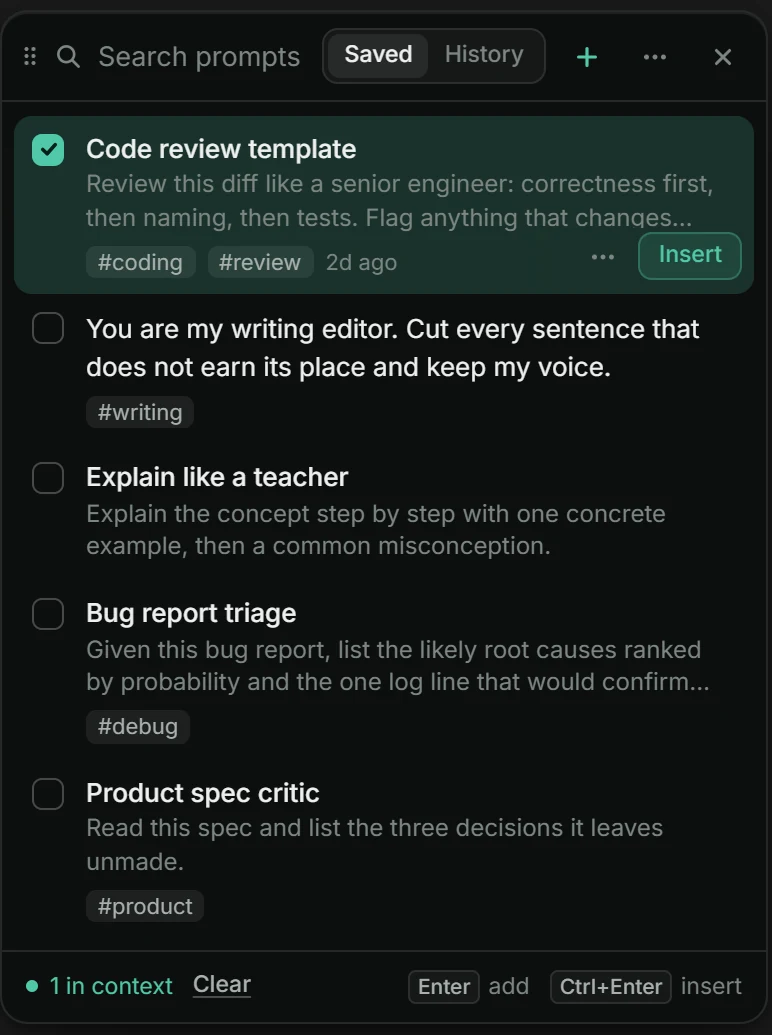
Search, tag and tick the prompts you want as context for the next rewrite. Your rewrite History sits one tab over.

  • Signed in, your library and History follow you to every computer
The prompt library panel with Saved and History tabs, a search box, and saved prompts such as “Code review template” and “Bug report triage” with tags.
  • Three styles

    Shorter, More detail or Open-ended in one click when the first rewrite is not quite it.

  • Keeps your meaning

    It rewrites the request instead of answering it, and aims to keep your names, numbers, code and language, Hinglish included.

  • Voice input

    Speak a prompt with Alt+Shift+V and check the transcript before it is rewritten.

  • Learns what works

    Rate a rewrite with a thumbs up or down. Prompt tracking stays off unless you turn it on.

Your data

Told up front, sent only when you ask.

Prompt Memory does nothing in the background. It reads your draft when you press ⊕, and the first time it tells you exactly what will be sent.

Read the privacy policy →
  • Signed in

    Your draft and a few recent messages from the open chat go to our server and an AI provider. Drafts and rewrites are kept in your History. Chat context has an off switch.

  • Your own key, no account

    The draft goes straight from your browser to the provider you chose. Your key stays in this browser's storage.

  • Leaving

    Delete your account and everything stored with it from the extension's toolbar menu.

Pricing

Free, two ways.

Most people start here

Sign in with Google

$0

Use our AI key and keep your prompts in a personal library.

  • 15 rewrites a day, no card needed
  • Saved prompts and History on every computer
  • Voice input with transcript review
  • All three rewrite styles
Get the extension

If you have an API key

Bring your own key

$0

Send drafts directly to your provider, with or without an account.

  • Groq, Gemini or OpenRouter
  • Your key stays in this browser
  • Review every rewrite before use
  • Your provider's charges and terms apply
Get the extension

Install

Try it in desktop Chrome.

The Chrome Web Store listing is on its way. Until then, installing by hand takes about two minutes.

  1. Get the files. Open the project on GitHub, choose Code → Download ZIP, and extract it. If someone sent you an extension ZIP, extract that instead.
  2. Load the extension. Open chrome://extensions, turn on Developer mode, and choose Load unpacked. Pick the extension folder inside the project, or the extracted folder that contains manifest.json.
  3. Choose your setup. Pin Prompt Memory from Chrome's Extensions menu and open it. Read what is sent, then continue with Google, or choose I have my own API key.
  4. Try one rewrite. Reload an open chat tab, type the sample below without sending it, and press ⊕.

A safe first test

Write a friendly email to a fictional teammate, Alex, asking to move our project check-in from Tuesday to Thursday. Keep it under 100 words. Do not invent a reason.

Installed, but the button is missing?

Reload the chat page after installing or updating. Check that Prompt Memory is turned on in Chrome's Extensions page and allowed on that site. Still missing? Email hello.promptmemory@gmail.com with the site and the error message, but no API keys or private conversations.

FAQ

Questions people ask first.

Is Prompt Memory free?

Yes. Sign in with Google for 15 free rewrites a day, with no card needed. If you already have a Groq, Gemini or OpenRouter API key you can use that instead, with or without an account.

Which AI chat sites does it work on?

ChatGPT, Claude, Gemini, Perplexity and Grok, in desktop Chrome.

Does it send my message for me?

No. The rewrite appears on a card beside the chat box. You choose whether to replace your draft with it, and nothing reaches the chat until you press send yourself.

What data does Prompt Memory send?

Nothing is sent until you press ⊕. Signed in, your draft and a few recent messages from the open chat go to our server and an AI provider, and you can turn chat context off. With your own API key and no account, the draft goes straight from your browser to that provider. The privacy policy has the full list.

Do I need an API key?

No. Signing in with Google is enough. An API key is optional, for people who would rather use their own provider account.

How do I delete my data?

Open the extension from the Chrome toolbar, choose Delete account and data, and type DELETE to confirm.

Give your next prompt a clearer start.

From “explain this bug” to a precise request with context and constraints. Read the rewrite, then send only what you choose.

Get the extension free